


Ahlem Mahroua is the founder of nova*, a Marketing Advisory Studio helping founders and premium B2B firms become easier to find, trust, and choose. She has 20+ years of operator experience and has advised 400+ founders and enterprise boards across the GCC and Europe, including through Hub71, Sheraa, Plug and Play, and Techstars.
Connect with Ahlem Mahroua on LinkedIn.
Table of Contents – AI business automation platforms
If you’re trying to figure out what the leading AI platforms for business automation actually are, and which ones belong in your specific stack, you’re asking the right question.
Many founders running growth-stage businesses have already tried several AI automation platforms.
They’ve watched demos, signed up for free trials, and spent weekends configuring workflows. And yet, Monday morning still feels the same: chasing leads manually, updating CRM records by hand, wondering why the tools they’re paying for aren’t doing more of the work.
The problem isn’t a shortage of capable platforms. The problem is that tools get layered on without a blueprint. Each one solves a narrow problem in isolation, and collectively they create a system that’s more fragile, more expensive to maintain, and harder to debug than the manual process it replaced. The result is a stack, not a system.
The platforms covered here, Make, Zapier, HubSpot AI, Salesforce Einstein, and a handful of others, are all capable of delivering genuine efficiency gains in the right configuration.
But knowing which ones belong in your specific architecture, and how to configure them to work together, requires a different kind of thinking.
That’s what this article is about.
By the end, you’ll have a shortlist of two to three platforms that match your company size and use cases, a clear set of evaluation criteria, and a practical method for running a pilot in 30 days.
Why adding more automation tools usually makes things worse
There’s a quiet contradiction that many founders experience at some point. They spend weeks setting up an automation stack and still find themselves the bottleneck in every revenue conversation. The tools are running, technically. But nothing material has changed.
The real issue is sequencing.
Most businesses automate the symptoms, repetitive tasks, data entry, follow-up emails, before they’ve addressed the underlying process gaps those tasks are masking.
An automated sequence built on top of a broken qualification process doesn’t improve conversion. It just generates faster noise.
The workflow sprawl problem no one talks about
It starts reasonably enough. One platform for email sequences. Another for CRM updates. A third for reporting.
None of them fully integrated.
Before long, you have Zapier triggering an action that HubSpot also tries to handle independently, and neither system has the complete picture.
The hidden cost isn’t just the subscription fees, it’s the hours spent on manual data reconciliation, conflicting contact records, and broken triggers that fail silently.
Intelligent automation software that isn’t connected at the data layer creates the illusion of efficiency. It moves information faster, but it moves incomplete information faster.
That’s not a technology problem. It’s an architecture problem.
What founders actually need before they pick a platform
Before evaluating a single platform, answer three questions:
- Which workflows are actually worth automating?
- Which of those are genuine bottlenecks in the revenue process?
- And which tools will your team realistically maintain six months from now?
The answers narrow the field considerably and change which platform belongs in your stack. This is strategic infrastructure work, not software procurement.
Before you pick a single tool, you need a clear picture of your own workflow.
Ahlem Mahroua, founder nova* growth studio
The leading AI platforms for business automation in 2026
The platforms worth knowing fall into three distinct categories, each suited to a different layer of your operations. Grouping them by use case, rather than ranking them arbitrarily, is the more honest and useful approach.
For a recent side-by-side comparison of many AI automation vendors, see the AI automation platforms compared overview.
Workflow automation builders: Make, Zapier, and n8n
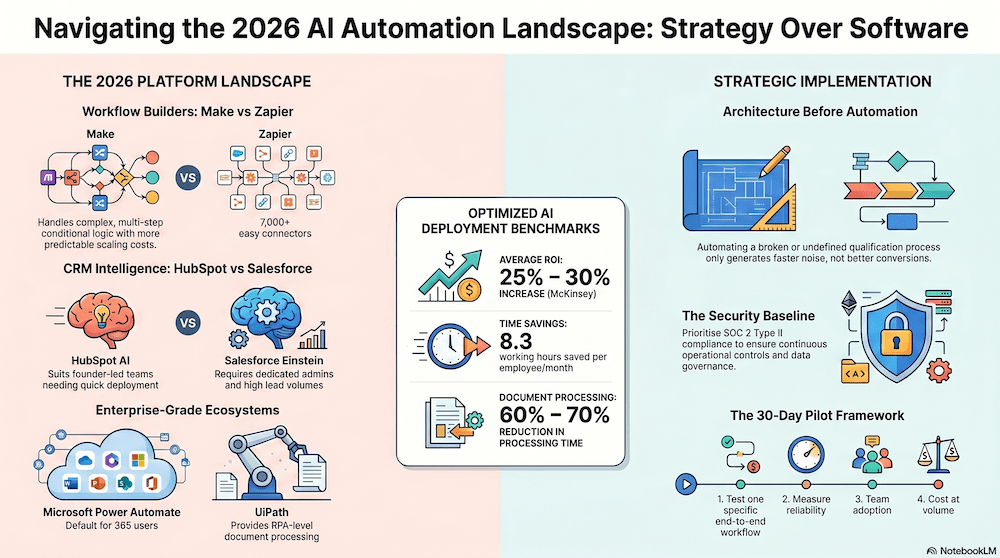
- Make (formerly Integromat) is a capable mid-market AI workflow automation tool, offering AI Agents with goal-driven, autonomous tool selection and Model Context Protocol (MCP) server functionality. It handles multi-step, conditional logic well at scale, with Core plans starting at $9 per month for 10,000 operations.
- Zapier remains the most accessible entry point, with over 7,000 app connectors and an AI Copilot that auto-generates Zap structures; Professional plans start at $19.99 per month for 750 tasks. The key trade-off: Zapier’s task-based pricing escalates quickly at volume, while Make’s operations-based model stays more predictable as workflows grow.
- n8n is the option for technically comfortable teams that want control without surrendering it to a proprietary platform. It’s open-source, self-hostable, and available on cloud at $20 per month. If your team has a developer or a technically literate ops person, n8n offers flexibility that Make and Zapier don’t. If it doesn’t, n8n will create maintenance overhead that outweighs the savings.
CRM and revenue intelligence: HubSpot AI and Salesforce Einstein
For revenue-specific automation, lead scoring, deal stage progression, email personalization, pipeline forecasting, the comparison between HubSpot AI and Salesforce Einstein comes down to team configuration, not feature superiority.
- HubSpot AI (Breeze) is the better fit for founder-led teams and growth-stage companies that need quick deployment without a dedicated CRM administrator. Professional plans sit at roughly $100 per user per month and include AI features without add-on costs. Setup is measured in hours, not months, and HubSpot’s own 2025 State of Sales data indicates that a strong majority of users report spending significantly more time on actual selling after implementation.
- Salesforce Einstein serves companies with dedicated RevOps or CRM admin resources. It offers deeper predictive accuracy and more customization for complex, multi-stakeholder B2B sales cycles, with sales forecasting precision improvements documented in Salesforce’s published case studies. It requires 1,000 or more leads and substantial historical data to perform well, and total costs frequently exceed $165 per user per month when add-ons are included. It’s the right choice when you’re scaling a commercial team, not when you’re still the primary salesperson.
For additional context on how modern tools fit into revenue stacks, review this primer on revenue intelligence platforms.
Enterprise-grade platforms: Power Automate, UiPath, and Automation Anywhere
These platforms serve teams with larger operational complexity and specific compliance requirements.
- Microsoft Power Automate at approximately $15 per user per month is the natural choice for businesses already running on Microsoft 365; the integration depth within that ecosystem is genuine.
- UiPath and Automation Anywhere bring RPA-level automation to document processing and exception handling at scale, with AI agents capable of handling generative workflow generation and autonomous exception resolution.
Both require meaningful implementation lift and typically suit organizations with 50 or more employees, or regulated workflows where audit trails and process governance are non-negotiable.
How to choose the right AI platforms for business automation
Picking the right AI orchestration platform isn’t about which one has the most features. It’s about which one handles your specific data flows, respects your compliance requirements, and stays affordable at the volume you’ll actually generate.
Security, compliance, and data governance
For any B2B operation handling client data, SOC 2 Type II and GDPR compliance represent the widely recognized baseline.
SOC 2 Type II (not Type I) is the meaningful designation because it reflects continuous operational controls, not a point-in-time audit. Beyond certification, verify that any platform you’re evaluating offers role-based access controls, comprehensive audit logs, and encryption in transit and at rest.
Platforms with native AI agents, including Make’s AI Agents, need to meet governance standards for autonomous decision-making, which is particularly relevant if you’re operating in regulated markets or planning EU expansion under the emerging AI Act framework.
For a clear primer on the differences and why Type II matters for ongoing controls, see this SOC 2 Type II overview.
Native integrations and what happens when tools don’t talk
The distinction between native connectors and webhook workarounds matters more than most buyers realize.
Native integrations, Salesforce to HubSpot, Make to OpenAI, Power Automate to Microsoft 365, carry lower maintenance burden and better data fidelity. Webhook chains are fragile: they break on API updates, fail silently, and create invisible gaps in your pipeline data.
Before committing to any platform, check the specific connector documentation for your existing CRM, email platform, and data destination. A platform with 7,000 connectors is only useful if the specific connectors you need are maintained and not reliant on workarounds.
If you’re evaluating approaches to unify connectors across CRM and ERP systems, the guidance on a unified API for CRM and ERP integrations is a practical place to start.
Pricing models and what they cost as you scale
Entry pricing on almost every AI automation platform looks reasonable. The trap is that costs scale fast with volume.
- Make and Zapier use operations- and task-based models respectively;
- Lindy uses a credit-based structure at $49.99 per month for 5,000 credits;
- Power Automate is user-based at roughly $15 per user per month.
For a small production stack, say, a few hundred automations per day across one or two workflows, budget in the range of $50 to $200 per month and validate usage caps during any free trial before building core workflows on it.
A platform that costs $20 per month for a prototype can reach $400 per month at production volume once task counts, user seats, and premium connectors stack up.
Run that calculation before you build anything significant on top of it.
What the ROI data says (and what it quietly leaves out)
The benchmarks from AI-powered workflow automation are real and worth knowing. Key figures from published research include:
- 25, 30% average ROI from AI-powered automation (McKinsey)
- 60, 70% document processing time reductions, consistently reported across industries
- 8.3 working hours saved per employee per month with Microsoft 365 Copilot (Microsoft, 2025)
- Order processing workflows reduced from 10 minutes to 90 seconds in optimized deployments
- Approximately $444,000 in annual labor savings for a 500-report-per-month expense workflow
- 90% of routine IT service desk requests automated in documented enterprise rollouts
These figures reflect optimized deployments with clean underlying processes, not rushed rollouts built on ambiguous workflows.
Most published case studies measure results 6 to 12 months after go-live, after the team has identified and fixed the initial setup mistakes.
The gap between “we turned it on” and “it actually works reliably” is rarely documented. Configuring triggers incorrectly, mapping the wrong data fields, or automating a process that wasn’t clean to begin with, these are where founders burn disproportionate time.
An automation audit before implementation changes the ROI picture significantly.
The strategic layer most founders skip entirely
Selecting the right enterprise AI platform is only half the work. The other half is designing how those platforms connect to form a unified revenue system.
Most founders who struggle with their automation stack aren’t using the wrong tools. They’ve built automation on top of workflows that weren’t working manually either.
That idea is central to our thinking in The Science Of Scaling, where subtracting complexity is shown to materially improve implementation outcomes.
Automating in the right order matters more than automating fast
Revenue architecture requires a deliberate sequence.
- First, clarify your pipeline stages.
- Then define your lead qualification criteria.
- Then establish your handoff points between marketing and sales.
Automating on top of an undefined process doesn’t accelerate growth, it locks in the chaos at machine speed. T
he founders who get the most from intelligent automation software are the ones who invest in process clarity before they open a single platform.
How nova* helps founders build an automation stack that holds together
At nova*, we work with founders and growth-stage companies as a Revenue Architecture and Growth Strategy Studio. In practice, that means helping clients decide not just which platforms to use, but how to configure them as a connected system across lead capture, nurturing, pipeline management, and conversion.
Rather than ending up with five tools doing overlapping jobs, nova* clients typically run on two to three tightly integrated platforms that map directly to their revenue workflow.
The value isn’t the software. It’s knowing which tools belong in your specific architecture, which ones don’t, and how to sequence the implementation so each layer builds on a stable foundation. Learn more about our approach on our Startup Growth Insights page.
How to shortlist and run a pilot in 30 days
The goal of a shortlist is to narrow your options to two or three platforms before you test anything. More than three makes comparison impossible; fewer than two gives you no frame of reference.
Matching platforms to your company size and use case
- For a founder-led team under 20 people focused on pipeline automation and lead nurturing, start with Make or HubSpot AI.
- For teams managing 50 or more people with cross-departmental workflows and compliance requirements, evaluate Power Automate or Salesforce Einstein.
- If you’re technically comfortable and want flexibility that proprietary platforms don’t offer, n8n gives you control at a lower cost.
The decision framework should be this simple. Complexity at the shortlisting stage usually means the process hasn’t been defined clearly enough yet.
If you’re working in or targeting the MENA region and need a founder-led GTM playbook, see our Go-To-Market Strategy For MENA In 2026 for region-specific guidance.
What a useful pilot looks like versus one that wastes your month
A 30-day pilot should test one specific workflow end-to-end: from lead entry to CRM update to follow-up sequence.
Measure trigger reliability, data accuracy, and time saved per week, not feature count or interface aesthetics.
At the end of 30 days, you need clear answers to three questions:
- Does the platform handle your edge cases reliably?
- Does your team actually use it without prompting?
- Does the pricing hold at your projected volume?
If you can’t answer all three after 30 days, the pilot wasn’t structured correctly. Restarting it on the same platform won’t change the outcome.
Identifying the leading AI platforms for business automation in 2026 is less about picking a winner and more about matching the right tools to a well-defined process. Make, Zapier, HubSpot AI, Salesforce Einstein, and the others covered here are all capable of delivering real efficiency gains, the differentiation is in how they’re configured and how deliberately they’re connected to each other.
If you know automation is the next step but aren’t sure which platforms belong in your architecture, that’s exactly the kind of conversation we have at nova*.
Strategy before software, always.
Identifying the leading AI platforms for business automation in 2026 is less about picking a winner and more about matching the right tools to a well-defined process. Make, Zapier, HubSpot AI, Salesforce Einstein, and the others covered here are all capable of delivering real efficiency gains, the differentiation is in how they’re configured and how deliberately they’re connected to each other.
If you know automation is the next step but aren’t sure which platforms belong in your architecture, that’s exactly the kind of conversation we have at nova*.
FAQ on AI business automation platforms for 2026
What are the best AI automation platforms for growth-stage companies?
The right platform depends on workflow complexity, team size, CRM maturity, and operational structure. Common options include Make, Zapier, HubSpot AI, Salesforce Einstein, Power Automate, and n8n.
What is the difference between workflow automation and revenue architecture?
Workflow automation focuses on task execution. Revenue architecture focuses on how lead generation, qualification, CRM management, follow-up, conversion, and reporting connect into a scalable commercial system.
Is Zapier or Make better for startups?
Zapier is typically easier for early-stage teams to deploy quickly. Make offers stronger conditional logic and often scales more predictably for complex workflows.
What AI tools work best for founder-led startups and growth-stage teams?
For lean commercial teams, practical combinations often include HubSpot AI, Make, Zapier, Clay, Apollo.io, and GPT-connected workflow systems. The key is integration architecture, not the number of tools.
Why do many AI automation projects fail?
Most failures come from automating fragmented or undefined processes. Without structured pipeline stages, ownership clarity, and connected systems, automation simply accelerates operational chaos.