


Ahlem Mahroua is the founder of nova*, a Marketing Advisory Studio helping founders and premium B2B firms become easier to find, trust, and choose. She has 20+ years of operator experience and has advised 400+ founders and enterprise boards across the GCC and Europe, including through Hub71, Sheraa, Plug and Play, and Techstars.
Connect with Ahlem Mahroua on LinkedIn.
Table of Contents – AI workflow Automation for Small Business
Many founders find they don’t have a time problem so much as a system problem.
The hours disappearing every week aren’t going to deep strategy or client relationships. They’re going to re-typing contact details into a CRM, drafting the same follow-up email for the fourth time, copying proposal text from last month’s version, and chasing leads that fell off the radar because no one set a reminder.
None of that requires your judgment.
It just requires your attention, and for small teams, attention is often the highest marginal cost there is. If you’ve been wondering how to integrate AI into a small business workflow without overhauling everything at once, the answer starts here: map the system first, then let the tools follow.
Integrating AI into your small business operations used to feel like a technology project. You needed developers, custom integrations, and a budget that only made sense at enterprise scale.
That’s no longer true.
The strategic question now isn’t “can we do this?” It’s “where do we start, and how do we know if it’s working?” At Nova*, we work with founders on revenue systems every day, and the same bottleneck shows up repeatedly: not a lack of effort, but a lack of structure around where effort goes.
By the end of this article, you’ll know exactly how to identify which tasks are worth automating first, which tools fit a lean team, how to run a 30-day pilot with clear KPIs, and why building a connected workflow matters more than collecting individual AI tools.
Before you pick a single tool, you need a clear picture of your own workflow.
Ahlem Mahroua, founder nova* growth studio
Start by mapping where your hours actually go
Before you pick a single tool, you need a clear picture of your own workflow. Most founders believe they know where time goes, but a week of honest tracking usually produces surprises. The audit doesn’t need to be elaborate. Fifteen minutes with a spreadsheet is enough to surface patterns that are quietly costing you hours each week.
The signals that a task is worth automating
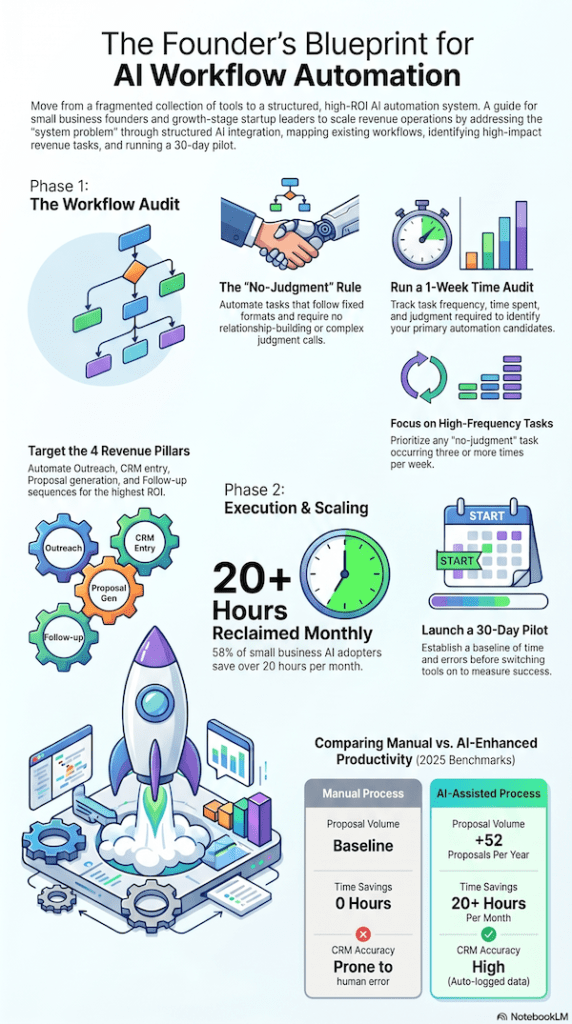
Not every repetitive task is a good automation candidate. The ones worth targeting share a specific profile: the task follows a fixed format every time, the output is predictable, the cost of a small error is low, and it doesn’t require a relationship or a judgment call. CRM data entry fits this profile. So does follow-up scheduling, first-draft outreach, and proposal generation from a template. If you could hand the task to a capable intern with a clear checklist, AI can probably handle it.
A simple workflow audit you can run this week
Build a four-column spreadsheet: task name, frequency per week, average time per instance, and judgment required (yes or no). Fill it in honestly across one full working week. Any task that scores “no” on judgment and appears three or more times per week is a reasonable candidate for your automation priority tier, treat this threshold as a practical heuristic rather than a hard rule, since every business will have different tolerances. These are the tasks where AI tends to deliver the fastest, most measurable return. Everything else can wait.
The four revenue tasks most worth automating when integrating AI into your workflow
Once you have your audit, a pattern usually emerges. Across the founders and B2B teams we see at Nova*, four task categories consistently produce the highest ROI when automated. Each one removes friction from a different part of the sales and revenue cycle.
Outreach and prospecting
AI can draft personalised outreach at scale using tools like Apollo.io, Clay, or a GPT-connected sequence builder. The key is having a clear ideal customer profile and a message framework in place before you switch anything on. The AI fills in the specifics from data signals: job title, company size, recent funding, or hiring activity. This is one of the highest-ROI AI use cases for small teams that don’t have a dedicated sales development function but still need consistent pipeline. For concrete examples of founder-led systems that scale outreach, see how we helped founders turn LinkedIn into a founder-led sales system, and for broader industry examples of AI use cases for small businesses.
CRM data entry and contact tracking
Manual CRM logging is one of the most consistent momentum-killers in small business sales. When every call, email, and meeting requires a manual entry, reps and founders skip steps, and the pipeline goes stale. AI-powered CRM features in HubSpot, Pipedrive, and Zoho CRM can auto-log calls, extract contact details from emails, update deal stages, and generate post-meeting summaries without human input. The result is a cleaner, more reliable pipeline with significantly less admin drag.
Proposal and document generation
The blank-page problem is real, and it slows down deal cycles more than most founders realise. Tools like PandaDoc AI or a well-structured GPT-connected template can generate a first-draft proposal from a brief in minutes. The founder reviews, refines the language, and adds judgment where it matters. A 2025 PandaDoc benchmark report found that proposal teams using AI submit an average of 52 additional proposals per year compared to manual processes. That’s pipeline volume without proportional time investment.
Follow-up sequencing
AI-driven follow-up tools, including Lemlist, Instantly, and HubSpot Sequences, can send contextually timed messages without manual scheduling. When connected to CRM deal stage triggers, they ensure that a lead moving from “proposal sent” to “no response for seven days” automatically receives a relevant follow-up rather than falling off the radar. The sequence runs on logic you define once. You stay in the conversation without manually tracking every thread.
Choosing low-code AI tools for small business workflow integration
The goal isn’t to find the most impressive platform. It’s to find tools that connect to what you already use, don’t require a developer to configure, and won’t become expensive at the scale you actually operate. Start with tools that integrate directly with your CRM or email provider. That’s your anchor point, and everything else should connect outward from there.
What to check before committing to a platform
A few things matter before committing to any automation platform. Does it integrate with the tools already in your stack? What happens when something breaks, and how accessible is the support? What is the real cost at your operating volume? Free tiers work well for pilots, but some platforms charge per action at scale, and those costs compound fast once workflows are running daily. Evaluating all three before signing up saves a painful migration three months in.
Platforms worth considering for small revenue teams
Zapier functions as a reliable workflow automation backbone with a wide app library and a genuinely accessible free tier. Make (formerly Integromat) handles more complex conditional logic if your workflows involve multiple branches. Clay is well-suited for AI-powered prospecting enrichment, pulling signals from multiple data sources to personalise outreach at scale. HubSpot’s built-in AI features are the most practical starting point for CRM-connected teams that want outreach, tracking, and follow-up in one place.
The objective is to connect two or three tools into a coherent flow, not to collect platforms. If you’re weighing no-code options, this comparison of no-code platforms for small businesses is a useful place to start.
How to integrate AI into a small business workflow: running a 30-day pilot
Once you’ve selected your tool and mapped your target workflow, the pilot itself needs structure to be useful. A pilot without a baseline is just an experiment with no conclusion, and the most common reason founders walk away from AI pilots unsure whether they worked is that they had no measurement in place before switching anything on.
Establishing your baseline before switching anything on
Spend two to four weeks measuring the current state of the workflow you’re targeting before making any changes. Track time spent on the task, error frequency, and output volume. This baseline is what makes the pilot results meaningful. Without it, “it feels faster” is the only available conclusion, and that’s not enough to justify scaling or to justify stopping.
The KPIs that give you a real answer at day 30
- Four metrics are worth tracking in any small business AI pilot.
- Time saved per week, expressed as hours reclaimed and converted to a dollar value based on your hourly rate.
- Error rate before and after.
- Output volume, meaning how many tasks completed in the same time window.
- And downstream impact: did faster follow-up change your conversion rate?
A 2025 Thryv small business survey found that 58% of small business AI adopters save more than 20 hours per month once workflows are running properly. A pilot that hits 20% or more improvement on time and output with no quality drop is worth scaling to the next workflow.
For frameworks and dashboards that help you prove ROI, see resources on proving AI ROI and adoption metrics.
Why a connected system beats a pile of disconnected AI tools
Most small businesses start AI adoption the same way: one tool at a time. Outreach automation in one platform, proposals in another, CRM data in a third, follow-ups in a fourth. Each tool solves a specific problem, but none of them talk to each other. The founder becomes the connective tissue, manually moving data between systems. The cognitive load doesn’t drop. It shifts shape.
The hidden cost of tool fragmentation
When tools don’t connect, data integrity suffers quickly. Leads fall through the gap between your outreach platform and your CRM. Proposal status doesn’t update deal stages automatically. Follow-up sequences trigger without knowing whether a proposal was already sent. The founder still has to remember who was contacted, what was sent, and what comes next. That’s the problem AI workflow automation was supposed to solve, and fragmentation prevents it from doing so.
What a structured AI-assisted revenue workflow looks like
This is where the architecture matters more than the tooling.
Rather than selecting tools in isolation, the more effective approach is to map the full revenue workflow first: how outreach feeds the CRM, how the CRM triggers the proposal, and how proposal completion starts the follow-up sequence automatically. AI then handles the repetitive logic at each stage, and the founder handles the relationship and judgment calls.
At Nova*, this is the work we do with growth-stage founders: designing the connected revenue system first, then identifying where AI fits into each stage. The result is a scalable sales operation where nothing falls through because the system holds it, not the founder’s memory, see our Quest Education Group case study for an example of a connected commercial growth engine.
Where to start from here
Integrating AI workflow automation for your small business doesn’t start with a tool purchase. It starts with a clear map of where time goes and which tasks follow a repeatable pattern. Run the audit this week. Pick one workflow from the four covered here. Baseline it for two weeks, then run a 30-day pilot with two or three KPIs you’ll actually check.
The founders who get the most from AI aren’t the ones using the most tools. They’re the ones who use the right tools inside a coherent system, where each part connects to the next and nothing depends on someone remembering to follow up. That’s the difference between adding AI features and building a genuinely integrated AI workflow for your small business, one that compounds over time rather than creating new maintenance work. For a quick readiness checklist you can run before a pilot, consult this AI readiness checklist for businesses.
If the system side of that equation needs structure, not just another tool recommendation, that’s a conversation worth having. It’s what Nova* is built for.
For more on why subtracting complexity matters as you scale, see The Science Of Scaling In 2026: Why Subtracting Complexity Places You A Cut Above.
FAQ on AI workflow Automation for Small Business
What is the best way for founders to start integrating AI into their business workflows?
Start with workflow mapping before selecting tools. The highest-ROI AI implementations usually automate repetitive revenue tasks like CRM updates, outreach sequencing, follow-up management, and proposal generation.
Which business workflows should be automated first with AI?
The best early candidates are repetitive, low-judgment tasks tied directly to revenue operations: lead qualification, CRM logging, follow-up sequencing, pipeline tracking, and first-draft proposal creation.
What are the biggest mistakes companies make when implementing AI automation?
Most companies layer tools onto broken workflows. The result is fragmented automation, inconsistent data, and higher operational complexity instead of efficiency gains.
What AI tools work best for founder-led startups and growth-stage teams?
For lean commercial teams, practical combinations often include HubSpot AI, Make, Zapier, Clay, Apollo.io, and GPT-connected workflow systems. The key is integration architecture, not the number of tools.
How do you measure ROI from AI workflow automation?
The strongest KPIs are time saved, reduction in manual admin work, improved CRM accuracy, faster follow-up execution, and measurable impact on conversion rates or pipeline velocity.




Comment
One thing I’d add: the bottleneck for small teams isn’t building the workflow, it’s knowing which steps actually move revenue. We wrote up a framework for auditing which tasks deserve automation, and when to leave things manual.